Become an affiliate partner and earn attractive commission.

How to Take a Suitable Student ID Photo

Education and Training

mini-logo

Lead Academy

8 Mins Read

Check your university, college or training provider’s instructions before taking or uploading your photo. There is no single UK specification for every student ID card. Requirements for file type, dimensions, file size, background, expression and how recently the image was taken vary between institutions.

This article offers general educational guidance to help you produce a clear head-and-shoulders photograph. Your institution’s current instructions always take priority. For example, the University of Oxford, University College London and the University of Edinburgh each publish their own student-card processes and requirements.

How to take a student ID photo with your phone

  1. Read the upload instructions first. Note the required image format, orientation, dimensions, maximum file size and submission deadline. Check whether your institution specifies a plain white or light-coloured background and how recent the photo must be.
  2. Prepare a plain background. Stand in front of a clean, uncluttered wall that contrasts with your hair and clothing. Avoid doors, posters, furniture and visible objects. Stand a short distance in front of the wall where possible, as this can reduce harsh shadows behind your head.
  3. Use soft, even lighting. Face a window or use a well-lit room so that both sides of your face are visible. Avoid direct sunlight, strong overhead lighting and bright light behind you. These can create shadows, glare or an underexposed face.
  4. Position the camera correctly. Ask someone to take the photo or place your phone securely and use its timer. Hold the camera at eye level, directly in front of you. Do not take the photograph from above, below or from one side. Avoid a close-range wide-angle selfie because it can distort facial proportions.
  5. Use portrait orientation. Include your full head and shoulders, leaving some space around the top and sides of your head so the image can be cropped. Do not crop off your hair, chin or part of your face. Look directly at the camera.
  6. Keep your face clearly visible. Move hair away from your eyes and avoid fashion hats, sunglasses and accessories that obscure your face. Head coverings worn for religious or medical reasons are commonly permitted, but the face will usually need to remain visible. Check your institution’s precise policy rather than removing a covering solely for the photograph.
  7. Use a natural expression. A neutral expression is the safest option unless your institution says otherwise. Keep your eyes open and your mouth relaxed. A mild smile may be accepted by some institutions, but requirements differ.
  8. Check prescription glasses for glare. Some institutions accept ordinary prescription glasses when the eyes remain fully visible. Turn slightly towards a softer light source or adjust the lighting—not your face—to remove reflections. Do not wear tinted glasses unless your institution permits them for a medical reason.
  9. Focus and review the original image. Check that your face is sharp, evenly lit and recognisable. Do not apply portrait-mode blur, beauty filters, colour effects, airbrushing or other retouching. Use a recent colour photograph that reflects your current appearance.
  10. Crop and export carefully. Crop to the proportions requested by your institution without stretching the image. Save it in the stipulated file type and check that it remains within the required file-size limit.

Student ID photo size, format and upload checks

Do not rely on a generic “passport photo size”. A student-card upload is a digital file, and each institution may set different technical rules. Before submitting it, confirm all of the following on the official upload page:

  • File type: JPEG or JPG is common, but use only the format requested.
  • Pixel dimensions: Check the minimum, maximum or exact width and height.
  • File size: Confirm the limit in KB or MB. Pixel dimensions and file size are not the same measurement.
  • Orientation: A vertical, portrait image is commonly requested.
  • Colour: Submit a colour image unless your institution expressly allows another option.
  • Recency: Use a recent photograph that accurately represents your present appearance, following any stated time limit.
  • Filename: Follow any naming convention, such as using a student or applicant number.
  • Upload preview: Make sure the system has not rotated, stretched or cropped the picture incorrectly.

If the portal rejects a large image, resize or compress a copy rather than repeatedly taking screenshots. Screenshots can reduce quality and may introduce interface elements or borders. Keep the clear original until your card has been approved.

Pre-upload rejection checklist

Requirements differ, but UK university guidance repeatedly focuses on whether the image is recent, clear and suitable for identifying the cardholder. Use this quick check after reading your own institution’s rules:

  • Only one person appears in the photograph.
  • The image shows a front-facing head-and-shoulders view.
  • The full face and eyes are clearly visible.
  • The camera is at eye level and the face is not tilted.
  • The background is plain and free from distractions.
  • The face is evenly lit, with no deep shadows or overexposed areas.
  • The image is sharp enough for reliable identification.
  • There are no filters, digital alterations or artificial background effects.
  • There is no glare across prescription glasses.
  • Any religious or medical head covering leaves the face visible, subject to the institution’s policy.
  • The image is recent and in colour if required.
  • The file type, dimensions and file size match the upload rules.

This checklist is a troubleshooting tool, not a substitute for the institution’s policy. If a requirement conflicts with an accessibility, disability, religious or medical need, contact the relevant student services or card office. They can explain the available adjustment or alternative process for your circumstances.

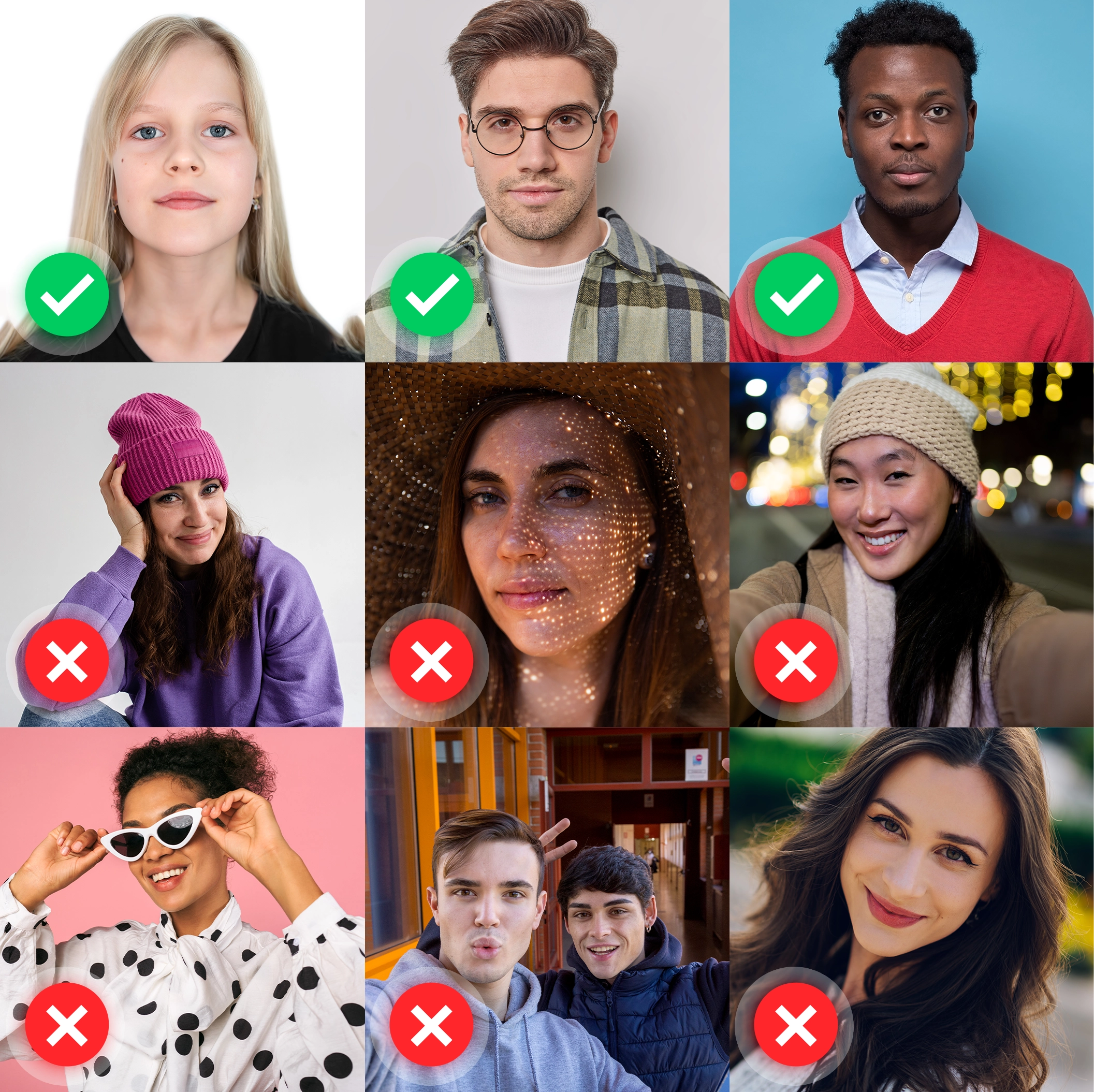
Examples of suitable and unsuitable student ID photos

Examples illustrating clear and unsuitable student ID photo composition

A suitable photo will usually have

  • A clearly visible, evenly lit face
  • A front-facing head-and-shoulders composition
  • A plain, uncluttered background
  • Natural colour and sharp focus
  • Enough space for the institution to crop the image

Common reasons a photo may be rejected

  • Hair, sunglasses or accessories obscuring the face
  • A fashion hat where the institution does not allow one
  • Beauty filters, retouching or altered facial features
  • A photograph taken from an angle
  • Dim, uneven or excessively bright lighting
  • A distracting background or foreground
  • Other people appearing in the photograph
  • Only one side of the face being visible
  • A camera positioned too close, high or low
  • A black-and-white image where colour is required
  • Low resolution, blur or heavy compression
  • An outdated photograph that no longer resembles you

What should you wear for a student ID photo?

Wear ordinary clothing in which you are comfortable being photographed. A top that contrasts with the background can help your shoulders remain visible. Avoid clothing or accessories that cover your face. Uniform, formal dress or a particular colour is not normally necessary unless your institution specifically requests it.

Fashion hats are generally unsuitable. Religious and medical head coverings may be allowed, typically provided that the facial features remain visible. Policies and any exceptions are institution-specific, so consult the official instructions or ask the card office before submitting your image.

Student ID photo FAQs

Can I take my student ID photo with a phone?

Usually, yes. A modern phone can produce a suitable image if it is stable, at eye level and set to capture a sharp, well-lit photograph. Use the rear camera or ask another person to help where practical. Your institution may still impose particular format and size requirements.

Can I smile in a student ID photo?

Rules differ. A relaxed, neutral expression is the safest choice. If your institution explicitly permits smiling, keep it natural and ensure that your face remains easy to identify.

Can I wear glasses?

Ordinary prescription glasses may be accepted by some institutions if your eyes are visible and the lenses have no glare. Sunglasses and heavily tinted lenses are generally unsuitable unless an authorised medical exception applies. Check the relevant policy.

Can I wear a head covering?

Fashion hats are normally unsuitable. Head coverings worn for religious or medical reasons are commonly permitted when the face remains visible, although exact requirements and support arrangements differ. Contact your institution if its published guidance does not address your needs.

Does a student ID photo have to be passport size?

Not necessarily. Institutions often request a digital portrait and define it through pixel dimensions, aspect ratio and file-size limits rather than printed passport-photo measurements. Follow the upload specification exactly.

What should I do if my photo is rejected?

Read the rejection message and compare the image against the institution’s current rules. Check the background, framing, lighting, focus, recency, orientation, format and file size. If the reason remains unclear—or relates to an accessibility, religious or medical requirement—contact the card office or student services rather than repeatedly submitting altered files.

Before you submit

A successful student ID photograph is usually simple: recent, clear, front-facing and correctly formatted. The most important final step is to compare your file with your own institution’s official instructions. Requirements can change, and only the issuing institution can confirm whether a particular image will be accepted.

Need a student ID card?

Eligible Lead Academy learners can find information about ordering a student ID card and the applicable terms on our dedicated page.

Published by Lead Academy’s editorial team as general educational guidance. Institution-specific rules and case-specific support should be confirmed with the relevant university, college or training provider.

What to Read Next:

Categories:

Education and Trainingskills development

Like This Article?

Share it on social.